
Football/Soccer Session (Moderate): Technical Unopposed and or semi opposed TURNING drills

See the guidance at the top of this page to understand why you are not seeing interactive Football/Soccer images.
See the guidance at the top of this page to understand why you are not seeing interactive Football/Soccer images.
Screen 2 (20 mins)
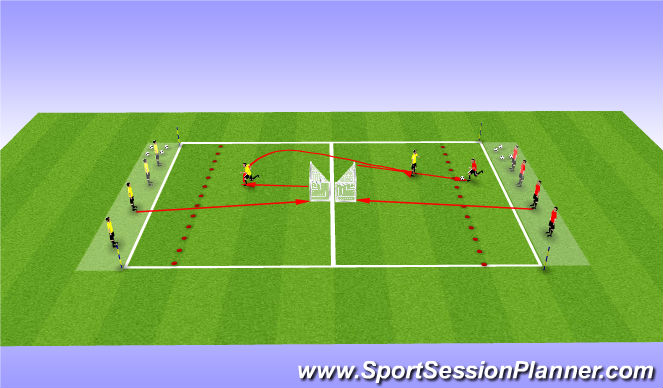
Conditioned Game associated with opposes skills - Numbers game (goals back to back) (25 mins)
Organization:
36 x 20yrd field.(1 ende zone at each side 3yrds)
2 lines of cones 3 yards away from the end line
6 yellows, 6 Reds
Mini goals or Pug goals
Soccer balls, color vests, cones
EXECUTION
Players will be numbered 1-6 on each team. Coach calls out multiple numbers (e.g. 1,2,3). Players from each team run out and touch the goal and run back to the red markers, first team back gets possession of the ball and then attacks opponents goal. Players can score in any goal
Coaching Points:
- When to pass, when to dribble When to turn
- Attack space
- When to use turns (i.e. when one goal is marked, turn away and attack other goal)
- Look over your shoulder to see where is the defender and where is the space to turn.
Progressions:
- 1v1's, 2v2s, 3v3s, 4v4s etc.
See the guidance at the top of this page to understand why you are not seeing interactive Football/Soccer images.
Screen 3 (30 mins)
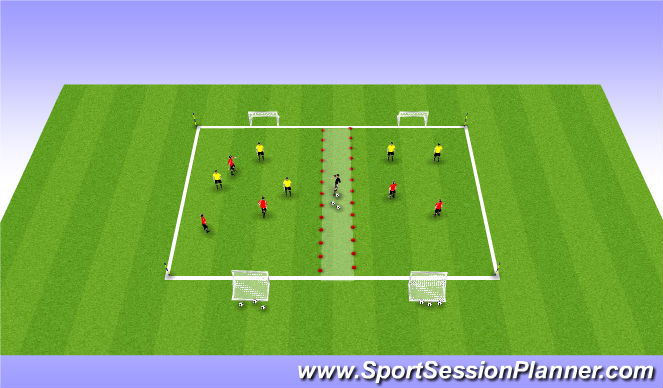
CONDITIONED - SSG - 30 minutes
Every time a player perform a technical turn his teram get 1 extra point.At the 15 minutes switch the teams around.

 Play animation
 Play step-by-step
 Repeat (toggle)
 Full Screen
 Pause
Pause Stop
Stop
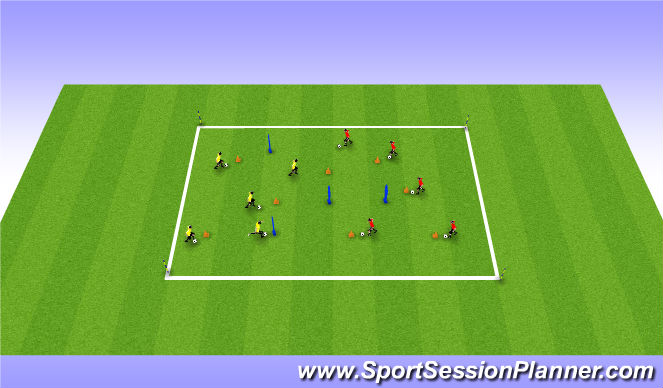
Screen 1 (20 mins)
Turns Unopposed (25 mins)
Organization:
30x30yrd grid.
Few Cones scattered around the grid.
4 or 5 manequins or poles(to improove creativity, and more challenge)
GUIDED QUESTIONS:
Where is the empty space? Left/Right/Ahead
Where should you turn?
How should you turn? Inside,Outside,
EXECUTION
- Players to dribble around the area in/out of the cones.
- Players with a ball each doing ball mastery moving from cone to cone: ba
ll touches, outside/inside, toe taps, rolls, roll-stop etc. (moves carried out using inside, outside, and bottom of the left foot and right foot)
- Players to practice turns at the cones (i.e. dribble up to a cone and perform a turn away from it). Turns include; Outside turns, inside turns,brazilian inside open(using inside the foot pulling the ball back and out away from the cone or obstacle),Cruif 1x touch(with your back foot,play the ball under your legs,pulling the ball away from the cones, or obstacle.Then you will use the opposite outside part of your foot to accelerate with the ball),outside and V turn, maradona,etc.
Dribbling and turning games:
How many cones can you turn into in a given time?
Coaching Points:
- Head up and look for space (look for a cone that other players are not going to).
Also when doing your ball mastery look forward at the cone, training to get head up when moving with the ball.
- Body shape when turning away from a cone, or your obstacles
- Turning Moves done at speed and keep the ball under control
Progressions:
- Creativity